
Arduino, ESP32 and IoT Projects with Code and Circuit Diagrams
Step-by-step electronics projects for students and makers: components list, pin-to-pin wiring table, connection diagram, tested code and troubleshooting in every guide.
- New project every hour
- 10 boards & categories
- Free code & wiring
- Easy English + Hindi tips
Latest Projects
All projects →- ESP32 Smart Curtain Opener with Stepper, LDR, OLED & Web Control
 Build an ESP32 smart curtain opener that pulls the curtain cord with a 28BYJ-48 stepper, opens with daylight or at a set time, and is controlled from a phone web page, a push button and an OLED status screen.
- Wemos D1 Mini Wi-Fi Lux Meter with BH1750 & OLED
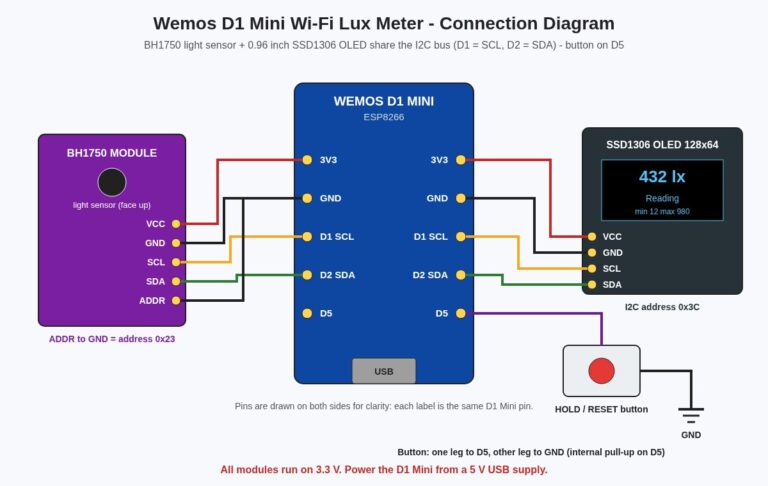 Build a pocket Wi-Fi lux meter with a Wemos D1 Mini, a BH1750 light sensor and a 0.96 inch OLED that shows light level, min/max and a room rating, plus a live phone web page.
- Sound Level Meter with LM3914 10-LED Bar Graph, LM358 & 555 Noise Alarm
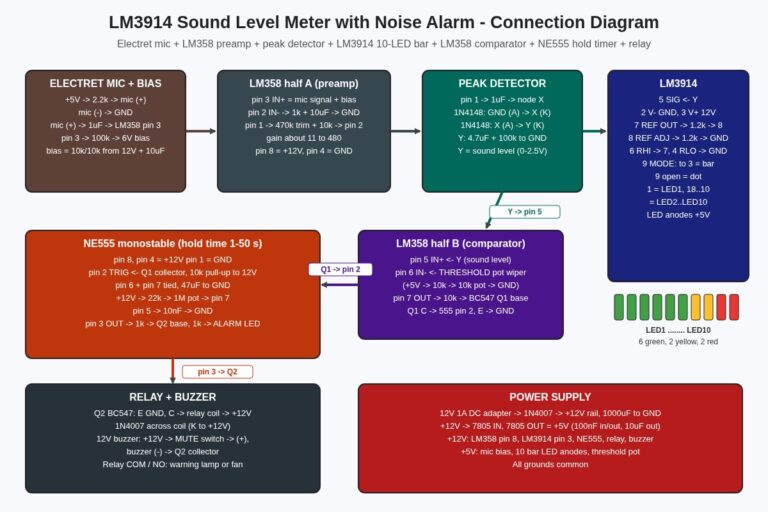 Build a no-code sound level meter that shows noise on a 10-LED LM3914 bar graph and switches on a buzzer and relay for an adjustable time when the noise goes above a level you set, using an LM358 mic preamp and comparator and an NE555 timer.
- Arduino Mega 2560 Calculator with 4×4 Keypad, 16×2 I2C LCD & Buzzer
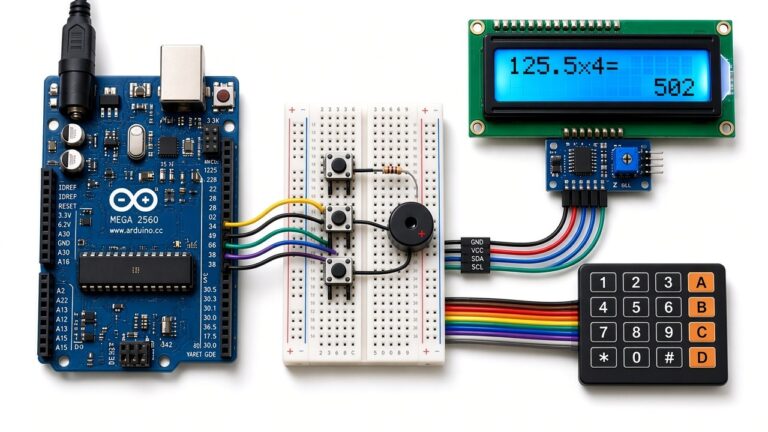 Build an Arduino Mega 2560 calculator with a 4×4 keypad and three extra buttons for clear, delete and shift functions, a 16×2 I2C LCD that shows the sum and the result, and a key-click buzzer.
- ATmega16 Digital Metronome with 4-Digit 7-Segment Display, Tap Tempo & Accent Beat
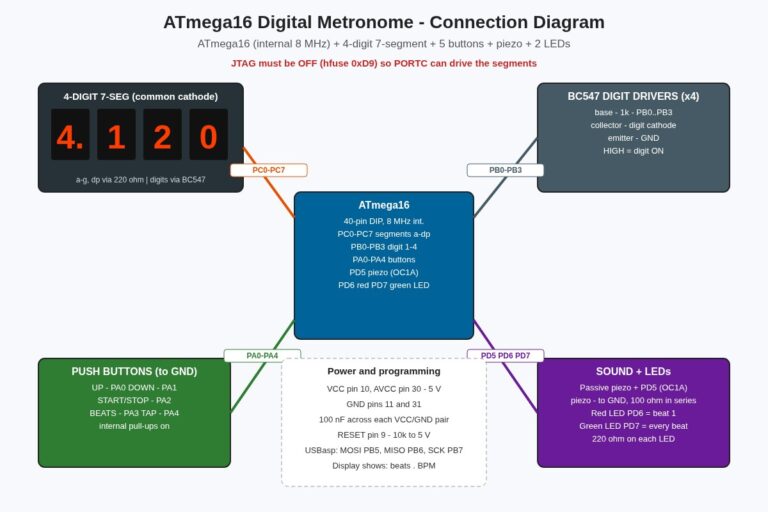 Build an ATmega16 digital metronome that shows the tempo (30–250 BPM) and the beat number on a 4-digit 7-segment display, clicks a piezo with an accented first beat, flashes two LEDs and supports tap tempo and 1–9 beats per bar.
- Arduino Colour Sorting Machine with TCS3200, Servo Chute, IR Feeder Check & 16×2 LCD Counter
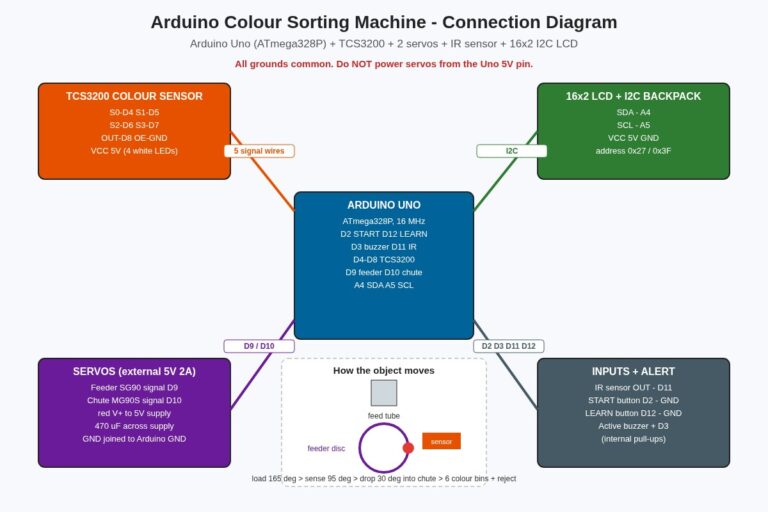 Build an Arduino Uno colour sorting machine that feeds objects one by one, reads their colour with a TCS3200 sensor, turns a servo chute to the right bin and counts every colour on a 16×2 LCD, with a learn mode and EEPROM memory.
- Raspberry Pi Pico Simon Says Memory Game with LEDs, Buzzer, OLED & High Score (MicroPython)
 Build a Raspberry Pi Pico Simon Says memory game in MicroPython: four coloured LEDs and buttons, a musical buzzer, an OLED that shows the level, and a high score that stays saved in flash even after power-off.
- ESP32 BLE Relay Switch with Push Button & Phone Control (No Wi-Fi Needed)
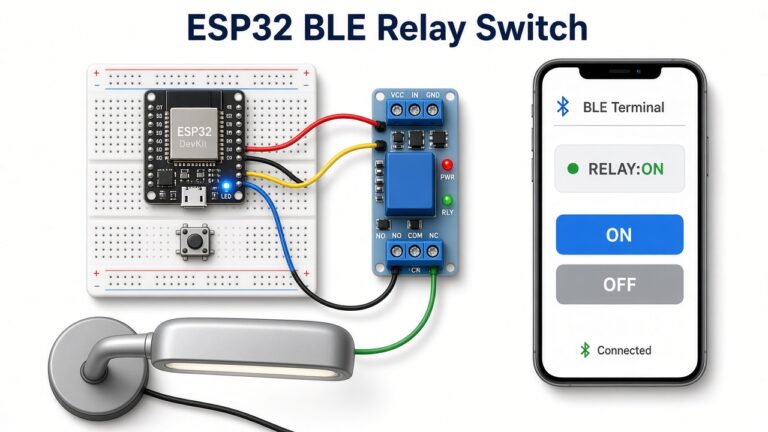 Switch a lamp or any small load from your phone with an ESP32 BLE relay switch: no Wi-Fi router or internet needed, a local push button for manual control, and live ON/OFF feedback in a free BLE terminal app.
- Wemos D1 Mini Bidirectional Visitor Counter with IR Sensors, OLED, Auto Light & Wi-Fi Dashboard
 Build a Wemos D1 Mini bidirectional visitor counter that uses two IR sensors to tell entries from exits, shows people inside on an OLED, switches the room light on while anyone is inside, beeps at full capacity and serves a live Wi-Fi dashboard.
Browse by Board & Category
Why Build With Us
Pin-to-pin wiring tables
Every project lists each connection, so you can wire it right the first time.
Connection diagrams
A clear diagram for every build, matching the wiring table exactly.
Tested, commented code
Arduino C++, MicroPython or AVR C, with library names and upload steps.
Difficulty & build time
Each project shows its level, board and parts count at the top.
Need a project ready-made?
Get a finished, tested project for your college submission or demo.
Buy Components
Arduino Uno R3ESP32 Dev BoardNodeMCU ESP8266Sensor KitPlaceholder links to Amazon search results – our own shop/affiliate links are coming soon. No prices listed.
Learn Arduino, ESP32 and IoT Step by Step
Start building useful electronics projects with clear, practical steps. Arduino Project Hub brings together Arduino, ESP32 and ESP8266 learning resources. The aim is simple: understand the circuit before you upload the code. Our explanations use easy English with familiar Hindi terms where helpful. Students, hobbyists and new makers can begin with a small circuit. You do not need to start with an expensive kit.
Choose a Project for Your Skill Level
New to Arduino? Start with a sensor and a simple display. A distance meter helps you learn digital pins, timing and LCD connections. A soil moisture project introduces analog readings and calibration. Change one setting at a time. Watch how the output changes. Keep notes about the board, sensor and power supply you use.
Ready for Wi-Fi? Explore ESP32 and NodeMCU ESP8266 projects. A weather station shows temperature and humidity in a browser. Home automation introduces web buttons and relay control. Begin with a low-voltage demonstration. Learn how the local network works before adding remote access. Never expose an unsecured device directly to the internet.
Explore Our Project Categories
IoT projects connect a sensor or controller to a network. Sensor guides explain how physical measurements become useful data. Home automation projects focus on switching and monitoring. Health projects introduce educational sensing experiments. Industrial topics cover control ideas and practical applications. Choose a category that matches your goal, then check the parts list before starting.
Build, Test and Troubleshoot
Read the whole project guide before connecting any wires. Compare the wiring table with the pin labels on your own board. Similar-looking boards can have different pin layouts. Install the correct board package and required libraries in Arduino IDE. Select the right board and port. Upload a basic test sketch first if the board is new.
If a project does not work, check power and ground first. Next, inspect loose wires and sensor connections. Use the Serial Monitor to read error messages and measurements. Confirm the baud rate matches the sketch. Check library versions when compilation fails. A careful check is usually more useful than changing the entire circuit.
Learn Safely and Make It Your Own
Use a suitable low-voltage supply for breadboard experiments. Disconnect power before changing connections. Relay modules do not make mains wiring safe for beginners. Ask a qualified electrician to handle mains-voltage work. Health sensor projects are for learning, not medical diagnosis. Protect personal information when sharing screenshots, code or network settings.
After your first successful build, improve one feature. Add a display, adjust a threshold or record readings. Explain what you changed and why it helped. Browse the latest projects below for wiring, code and next steps. Return to the basics whenever a new component feels confusing. Small, repeatable experiments build lasting skills.
About Arduino Project Hub
Arduino Project Hub is run by Raj Kumar Swarnakar to help students and makers build real electronics projects with Arduino, ESP32 and ESP8266. Every tutorial includes a components list, wiring table, tested code and troubleshooting tips – explained in simple Hindi + English. Read more on the About page, or see how we use cookies and analytics in the Privacy Policy.